
Azure Firewall Prescaling: Preventing Black Friday Spikes Before Autoscale Reacts
Understanding Azure Firewall Autoscaling
Azure Firewall runs multiple instances in the background, and the instance count is automatically managed by Microsoft due to its PaaS nature. To put it simply: as load on the firewall increases (based on average throughput, CPU, and connection usage metrics), Microsoft adds new instances to the backend (scale out). When load decreases, the instance count is reduced accordingly (scale in).
While this mechanism is useful, instance provisioning is not instantaneous and typically takes 4-7 minutes on average. This means unexpected traffic spikes can result in increased latency and packet loss.
Example: Your e-commerce site may experience unexpected traffic surges during Black Friday. Azure Firewall’s autoscale feature detects this increased load and triggers the provisioning of new instances in the background. During this window, existing instances are forced to operate beyond their capacity, leading to a degraded user experience including high latency, timeout errors, or even complete loss of connectivity.
What Changed with Pre-Scaling ?
Azure Firewall Prescaling is a feature that proactively scales firewall performance. It prepares the firewall for sudden traffic spikes by adjusting capacity to meet predefined minimum requirements before traffic actually increases.
How to configure it ?
You can access the scaling options by navigating to Azure Firewall > Scaling options in the Azure portal.
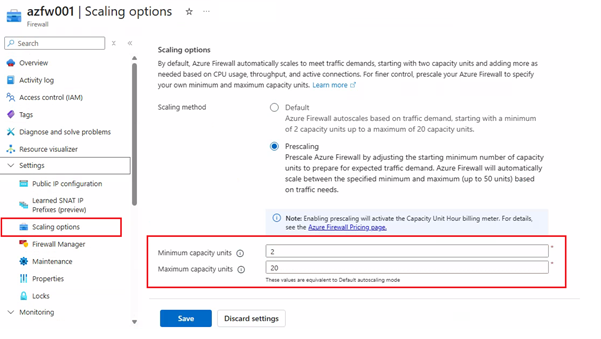
- Minimum capacity units: The capacity the firewall will have ready at all times.
- Maximum capacity units: The upper limit the firewall can scale out to.
Heads up: If you set the minimum capacity equal to the maximum capacity, autoscaling is disabled and the firewall runs in fixed capacity mode.
Well, What Capacity Do I Need?
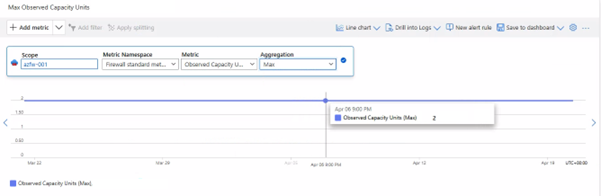
When determining minimum and maximum capacity unit values, you can review historical capacity usage through the Firewall Observed Capacity Units metric. However, since this only reflects past data, it cannot predict sudden traffic spikes from future scenarios that have never occurred before such as Black Friday events. For this reason, capacity planning should not rely solely on historical observed values. You must also account for business growth projections, peak traffic scenarios, and potential connection bursts.
In situations where traffic increases are unpredictable, the most practical approach is to collaborate with your marketing/sales teams to align on expected user volumes. Once you have agreement, run load tests using Azure Load Testing or a similar tool for the target number of users, then analyze the resulting Azure Firewall Observed Capacity Units logs to make your final decision.
Comments